What Is a Virtual Host? Host Multiple Sites on One Ubuntu VPS
A virtual host maps each domain to its own folder on one server. Developers use this on Ubuntu VPSes so portfolio, API, and staging share one bill. Same idea on any Linux — Ubuntu is just what most tutorials and clouds default to.
Quick Answer
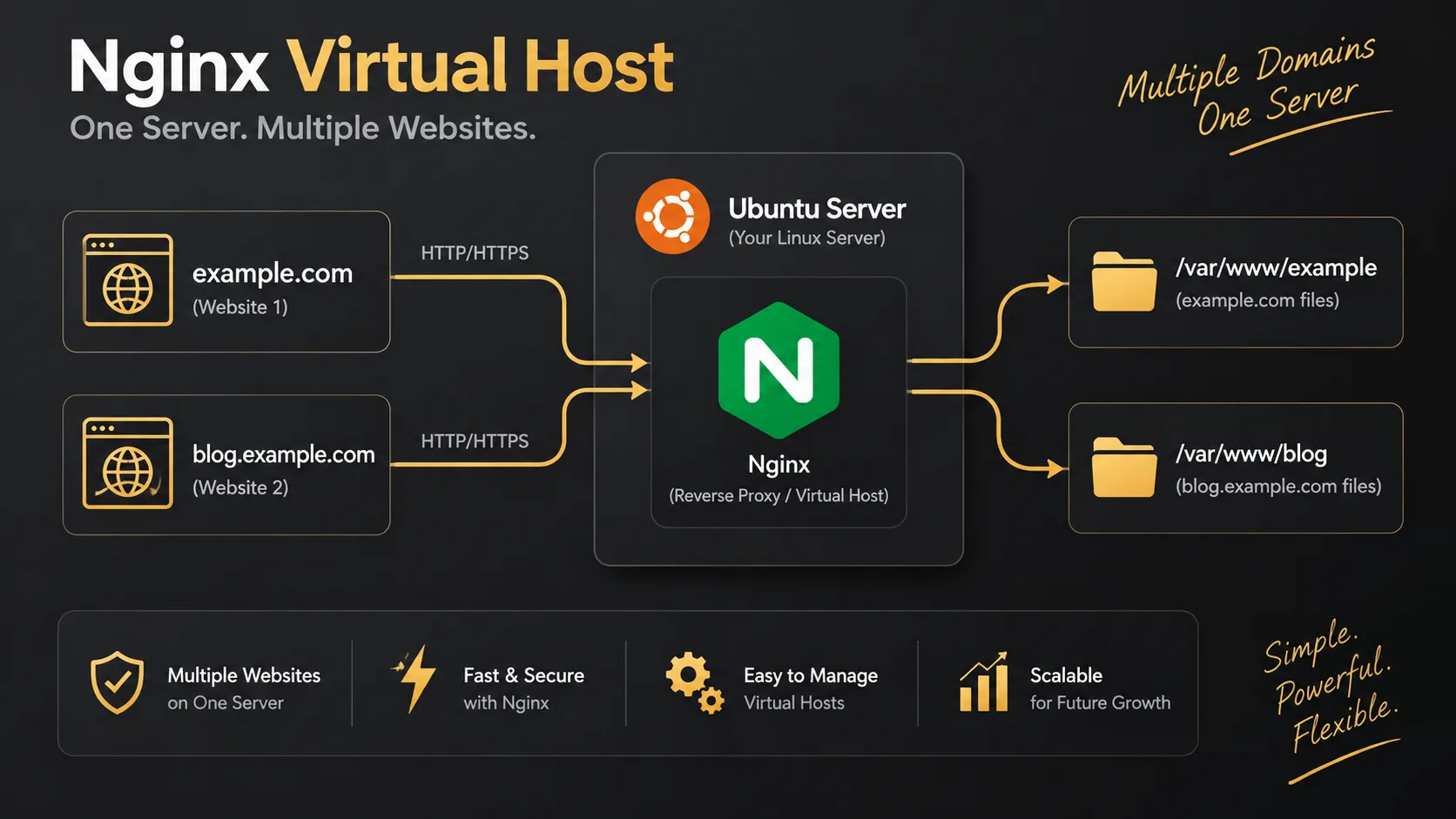
A virtual host is a web server config that maps a domain name to a folder on one machine. One Ubuntu VPS, many sites: the browser sends a Host header, Nginx or Apache picks the matching block. Developers use it so portfolio, API, and staging share one server bill instead of one droplet per project. Virtual hosts work on any Linux — Ubuntu is just the OS most VPS images and guides assume.
Quick Facts
| Item | Details |
|---|---|
| Topic | Virtual Host on Ubuntu (multiple websites) |
| Category | Linux / Ubuntu / Nginx / DevOps |
What Is a Virtual Host?
A virtual host (Nginx calls it a server block) tells the web server: if the request is for site-a.com, use this folder; if it is site-b.com, use that one. Same public IP. Different sites.
It is not a second virtual machine. It is not Docker by itself. It is config — usually under /etc/nginx/sites-available/ on Ubuntu.
Why does every guide say Ubuntu? Because DigitalOcean, Hetzner, Linode, and friends ship Ubuntu LTS as the default image, and apt install nginx plus systemctl show up in almost every Stack Overflow answer. Debian is nearly the same. Rocky/Alma use different package names and paths. The virtual host idea does not change.
For a Laravel / Nuxt developer, the usual story is: one modest Ubuntu VPS, Nginx in front, several domains — marketing site, API, maybe staging — instead of paying for three droplets.
Why It Matters
- One bill for several domains. Side projects and client staging stop needing a new server each time.
- Normal URLs on 443. Clients never see
http://IP:8081. - Ubuntu LTS stays supported for years, so the same vhost files and Certbot habit keep working without constant OS churn.
- Docs match your box. When something breaks at 1 a.m., the fix you Google is probably written for Ubuntu paths.
How It Works
You point DNS for each domain at the Ubuntu VPS IP. Nginx listens on 80/443. It reads the Host header (or SNI for HTTPS) and chooses a server block. Each block has its own root (or a proxy_pass to Node/php-fpm).
flowchart LR
  Dev[Developer] --> Ubuntu[Ubuntu VPS]
  Ubuntu --> NX[Nginx]
  NX -->|Host: a.com| A["/var/www/a"]
  NX -->|Host: b.com| B["/var/www/b"]
- DNS — A records for each domain → same VPS IP.
- Server block —
server_name+root(or upstream) on Ubuntu’s Nginx layout. - Default site — if the name does not match, the default block wins. Wrong site in the browser usually means this, not “Ubuntu is broken.”
sequenceDiagram
  participant Browser
  participant DNS
  participant Ubuntu as Ubuntu Nginx
  participant Disk
  Browser->>DNS: site-b.com?
  DNS-->>Browser: VPS IP
  Browser->>Ubuntu: Host site-b.com
  Ubuntu->>Disk: /var/www/site-b/public
  Ubuntu-->>Browser: 200
flowchart TB
  subgraph why [Why Ubuntu shows up everywhere]
    C[Cloud default image]
    P[apt + systemctl]
    D[Tutorials use same paths]
  end
  C --> V[Virtual hosts on one VPS]
  P --> V
  D --> V
Step-by-Step Guide
Assumes a fresh Ubuntu 22.04/24.04 VPS with sudo and Nginx. Apache is the same idea under /etc/apache2/sites-available/.
Step 1: Point DNS and create site folders
In Cloudflare / your DNS panel:
A    site-a.com        → YOUR_UBUNTU_VPS_IP
A    www.site-a.com    → YOUR_UBUNTU_VPS_IP
A    site-b.com        → YOUR_UBUNTU_VPS_IP
On the server:
sudo apt update
sudo apt install nginx -y

sudo mkdir -p /var/www/site-a/public /var/www/site-b/public
echo "Site A" | sudo tee /var/www/site-a/public/index.html
echo "Site B" | sudo tee /var/www/site-b/public/index.html
sudo chown -R www-data:www-data /var/www/site-a /var/www/site-b
Check DNS before you chase SSL errors:
dig +short site-a.comflowchart LR DNS[DNS A records] --> IP[Ubuntu VPS IP] IP --> F1[/var/www/site-a/public] IP --> F2[/var/www/site-b/public]
Step 2: Add one Nginx server block per site
Ubuntu’s pattern: write files in sites-available, symlink into sites-enabled.
# /etc/nginx/sites-available/site-a.com
server {
    listen 80;
    listen [::]:80;
    server_name site-a.com www.site-a.com;
    root /var/www/site-a/public;
    index index.html index.php;

    location / {
        try_files $uri $uri/ /index.php?$query_string;
    }
}
# /etc/nginx/sites-available/site-b.com
server {
listen 80;
listen [::]:80;
server_name site-b.com www.site-b.com;
root /var/www/site-b/public;
index index.html index.php;
location / {
try_files $uri $uri/ /index.php?$query_string;
}
}sudo ln -s /etc/nginx/sites-available/site-a.com /etc/nginx/sites-enabled/
sudo ln -s /etc/nginx/sites-available/site-b.com /etc/nginx/sites-enabled/
# optional: stop the default site from stealing unknown Host headers
sudo unlink /etc/nginx/sites-enabled/default
sudo nginx -t && sudo systemctl reload nginxOpen both domains. You should see “Site A” and “Site B”. Same page twice means the default server still owns the request.
flowchart TB
  Avail[sites-available] -->|symlink| Enabled[sites-enabled]
  Enabled --> Test[nginx -t]
  Test -->|ok| Reload[systemctl reload nginx]
  Test -->|fail| Fix[fix syntax - do not reload]
Step 3: Add HTTPS with Certbot on Ubuntu
sudo apt install certbot python3-certbot-nginx -y
sudo certbot --nginx -d site-a.com -d www.site-a.com
sudo certbot --nginx -d site-b.com -d www.site-b.com
sudo certbot renew --dry-run
For Laravel later, set root to /var/www/site-a/public and pass PHP to php-fpm. For Nuxt, proxy_pass to 127.0.0.1:3000. Same virtual host idea — only the location block changes.
Real-World Example
Stack: Ubuntu 22.04 on a small VPS, Nginx, two domains — a Nuxt site on the apex and Laravel on api.example.com.
First mistake: everything under /var/www/html. Nuxt’s SPA try_files swallowed /api and returned index.html.
Second mistake: Certbot only on the apex. After HTTPS redirects, api.example.com hit the default site. Felt like “Ubuntu SSL is broken.” It was a missing server block + missing cert for the subdomain.
flowchart TB
  subgraph before [Broken on one Ubuntu box]
    One["/var/www/html only"] --> Clash[SPA eats /api]
  end
  subgraph after [Fixed with two vhosts]
    N["example.com → /var/www/web"]
    A["api.example.com → /var/www/api/public"]
  end
sudo certbot --nginx -d api.example.com
sudo nginx -t && sudo systemctl reload nginx
Laravel APP_URL=https://api.example.com. Nuxt public API base pointed there. Wrong-site symptom gone once the default catch-all stopped owning unknown hosts.
That is the developer pattern: one Ubuntu VPS, virtual hosts for each app surface, not one server per URL.
Pros & Cons
Advantages
- Cheap multi-site hosting on one Ubuntu VPS.
- Commands and paths match the majority of public guides.
- Per-domain SSL and logs without extra machines.
Disadvantages
- Shared CPU/RAM — one busy Laravel app can starve the others.
- Apps share a filesystem; permissions still matter.
- If you learned only Ubuntu paths, moving to RHEL-like distros means relearning package names — the vhost concept stays, the files move.
Best Practices
- Stick to Ubuntu LTS on small project VPSes unless you have a reason not to.
- One config file per domain in sites-available; symlink into sites-enabled.
- Always
nginx -tbeforesystemctl reload nginx. - Disable or tighten the default site so unknown Host headers do not leak another project.
- Issue Certbot certs for every name you actually use (www, api, staging).
- Keep secrets out of the web root; Laravel document root is always
public.
Common Mistakes
- Thinking virtual hosts require Ubuntu. They do not — Ubuntu is just the common VPS default.
- Debugging Nginx while DNS still points elsewhere. Run
dig +shortfirst. - File sits in sites-available but was never symlinked to sites-enabled.
- Both domains show site A — default server caught the request.
- SSL only on the main domain; subdomain still on the wrong block.
- Laravel root set to the project folder instead of
/public.
Frequently Asked Questions
What is a virtual host?
A web server config that maps a domain to a folder or app on one machine. The browser sends Host; Nginx or Apache selects the matching site. On Ubuntu this is usually an Nginx server block in sites-available.
How do I host multiple websites on Ubuntu?
Point each domain’s A record at the VPS IP, create a folder per site, add a server block per domain, symlink into sites-enabled, run nginx -t, reload Nginx, then run Certbot per domain. Prove it with two HTML files before deploying Laravel or Nuxt.
Why do developers use Ubuntu for virtual hosts?
Clouds default to Ubuntu images, apt and systemctl are familiar, and almost every tutorial uses Ubuntu paths. Virtual hosts work on other distros; Ubuntu is the path of least resistance for most fullstack developers.
Is this worth it for a solo developer?
Yes once you have more than one domain or need staging beside production. For a single hobby site, one default server block is enough. For portfolio + API + client staging, one Ubuntu VPS with virtual hosts is the usual move.
Ubuntu with Apache instead of Nginx?
Fine. Use /etc/apache2/sites-available/, a2ensite, and apache2ctl configtest. Same virtual host idea. Many developers pick Nginx on Ubuntu because reverse proxy + static files is a common VPS pattern.
Summary
A virtual host routes domains to folders on one server. Developers do this on Ubuntu VPSes because the OS, packages, and docs line up — not because virtual hosts are Ubuntu-only. DNS hits one IP; Nginx server blocks pick the site; Certbot covers each name.
Today on your Ubuntu box: two domains (or one domain + subdomain), two roots, two server blocks, confirm different HTML on each URL, then add real apps.
Related: Apache vs Nginx.
Key Takeaways
- A virtual host maps a domain to a document root on a shared server.
- Developers favor Ubuntu VPSes for apt, LTS, and tutorial-friendly paths — the feature itself is distro-agnostic.
- DNS finds the IP; the Host header chooses the site.
- On Ubuntu: sites-available → symlink → nginx -t → reload.
- Disable a loose default site and cert every public server_name you use.
Comments
0 comments · new ones appear after approval
No comments yet. Be the first to share your thoughts.
Leave a comment
Your comment will be reviewed before it appears.