Laravel Queues & Jobs: How Background Processing Works
Laravel queues move slow work off the HTTP request. You push a Job onto a queue, a worker runs it later, and the user gets a fast response. Use them for mail, webhooks, image work, and anything that can fail and retry.
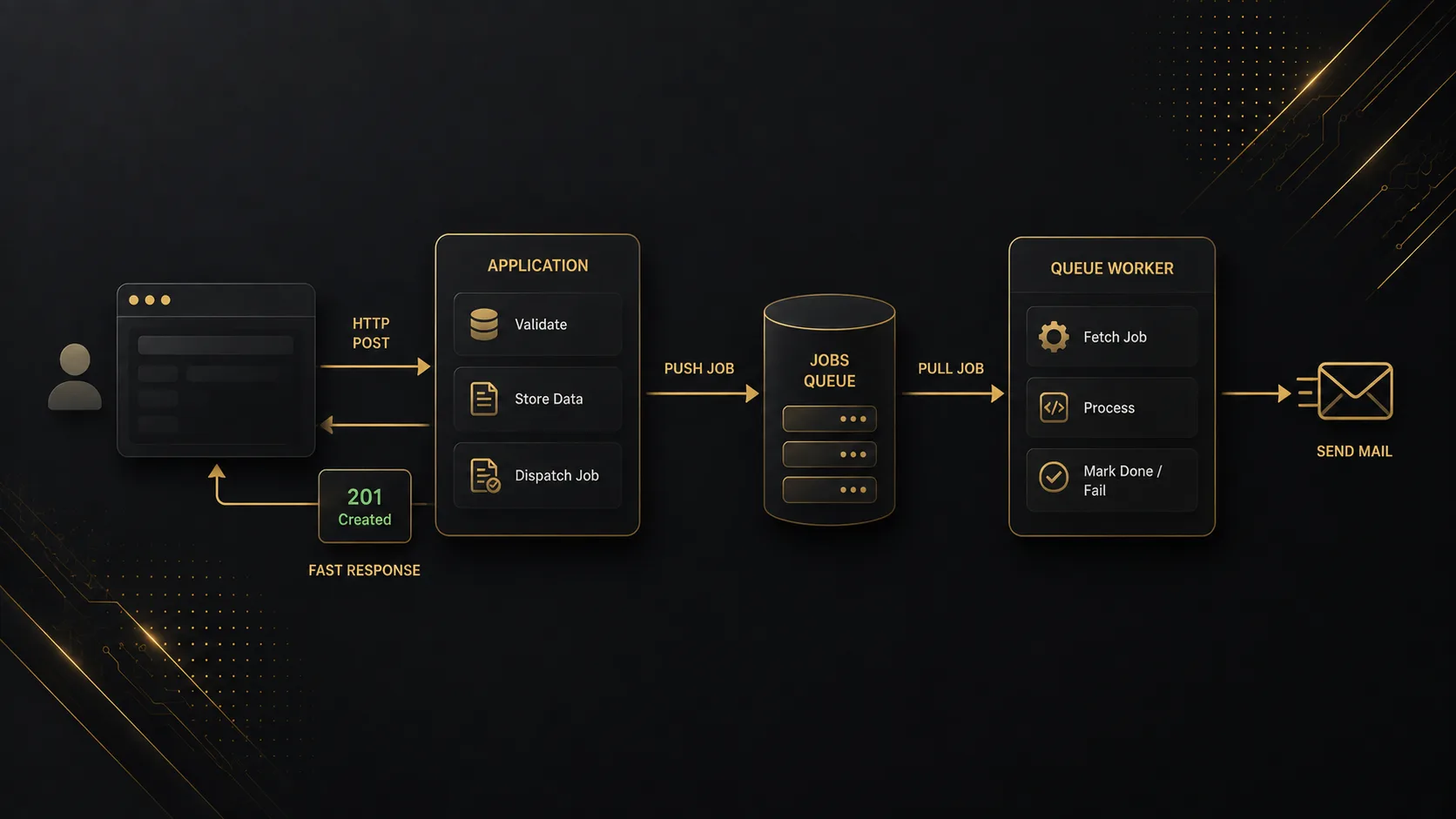
Quick Answer
Laravel queues run work after the HTTP response. You build a Job class, dispatch() it, and a worker process pulls it from a driver (database, Redis, SQS). Use this when the request would otherwise wait on mail, image resize, third-party APIs, or anything that can fail and needs a retry. The request stays fast; the job can take its time.
Quick Facts
| Item | Details |
|---|---|
| Topic | Laravel Queues & Jobs |
| Category | Laravel / PHP / Background Processing |
What Is Laravel Queues & Jobs?
A Job is a class with a handle() method. A queue is the place that Job sits until a worker picks it up. That is it.
This is not “async PHP magic” inside the same request. The web process serializes the job (or a reference to it), sticks it in a table/list, and returns. A separate process — php artisan queue:work — does the real work later.
If you have ever returned 200 to the browser and then sent email in the same controller, you already felt the pain queues solve. Mailgun hiccups, SMTP timeouts, 30-second gateway kills. Push it to a job and the HTTP path stays boring.
Why It Matters
- Users wait on what you do in the request. Resize a cover image inline and the upload form feels broken even when the file landed fine.
- External APIs fail. Queues give you retries and a
failed_jobstable instead of a half-finished signup with no welcome mail. - You can scale workers without touching PHP-FPM. More mail backlog? Spin another worker. The web boxes stay the same.
How It Works
Two timelines. Request path: validate, save, dispatch, respond. Worker path: pop job, run handle(), ack or fail.
sequenceDiagram
  participant Browser
  participant App as Laravel HTTP
  participant Q as Queue store
  participant W as queue:work
  Browser->>App: POST /register
  App->>App: Save user
  App->>Q: Push SendWelcomeMail job
  App-->>Browser: 201 Created (fast)
  W->>Q: Reserve next job
  W->>W: handle() send mail
  W->>Q: Delete job / mark done
Pieces that actually matter:
- Driver —
syncruns the job inline (fine for local “does it explode?”).databaseuses ajobstable. Redis / SQS for anything with real traffic. - Job class — implements
ShouldQueue, holds the payload (ids, not giant models if you can help it), runshandle(). - Worker — long-running CLI. No worker = jobs pile up and nothing happens. That surprise still gets people.
flowchart LR
  D[dispatch Job] --> Store[(jobs table / Redis)]
  Store --> W[Worker process]
  W -->|success| Done[Delete / ack]
  W -->|exception| Retry{Attempts left?}
  Retry -->|yes| Store
  Retry -->|no| F[(failed_jobs)]
flowchart TB
  subgraph sync [QUEUE_CONNECTION=sync]
    S1[dispatch] --> S2[handle runs now]
    S2 --> S3[Response waits]
  end
  subgraph async [database / redis]
    A1[dispatch] --> A2[Row / payload stored]
    A2 --> A3[Response returns]
    A3 --> A4[Worker runs later]
  end
Step-by-Step Guide
Step 1: Create the jobs table and pick a driver
If you use the database driver:
php artisan queue:table
php artisan queue:failed-table
php artisan migrate.env:
QUEUE_CONNECTION=databaseRedis instead? Set QUEUE_CONNECTION=redis and make sure the Redis connection in config/database.php actually works. I still start projects on database when Redis is not in the stack yet — slower, but one less moving part.
flowchart LR
  Env[QUEUE_CONNECTION] --> Sync[sync]
  Env --> Db[database]
  Env --> Redis[redis]
  Env --> Sqs[sqs]
  Sync --> Local[Local debug]
  Db --> Small[Small apps / simple deploys]
  Redis --> Prod[Most production apps]
  Sqs --> Scale[Multi-server / AWS]
Check: jobs and failed_jobs tables exist (database driver), or Redis accepts a ping.
Step 2: Generate a Job and dispatch it
php artisan make:job SendWelcomeMailnamespace App\Jobs;
use App\Models\User;
use App\Mail\WelcomeMail;
use Illuminate\Contracts\Queue\ShouldQueue;
use Illuminate\Foundation\Queue\Queueable;
use Illuminate\Support\Facades\Mail;
class SendWelcomeMail implements ShouldQueue
{
use Queueable;
public function __construct(public User $user) {}
public function handle(): void
{
Mail::to($this->user->email)->send(new WelcomeMail($this->user));
}
}Controller after create:
SendWelcomeMail::dispatch($user);
// or: dispatch(new SendWelcomeMail($user));
Prefer passing $user->id and reloading inside handle() if the model is heavy or might change before the worker runs. Serializing a full Eloquent model works until it does not (missing attributes, stale state, huge relations).
flowchart TB
  C[Controller] -->|dispatch user id| Q[(Queue)]
  Q --> H[handle]
  H --> Find[User::find id]
  Find --> Mail[Mail::send]
Smoke test with QUEUE_CONNECTION=sync once so exceptions show up in the request. Then switch back to database/redis and run a worker.
Step 3: Run a worker and handle failures
php artisan queue:work --tries=3 --timeout=90Production: Supervisor (or Horizon for Redis) so the worker restarts when it dies. Deploy without a worker and your jobs table grows while users wonder why mail never arrived.
public int $tries = 3;
public int $backoff = 30; // seconds between retries

public function failed(\Throwable $e): void
{
    // log, notify, mark signup as "mail pending"
}
flowchart LR Fail[Job throws] --> T1[Retry 1 after backoff] T1 --> T2[Retry 2] T2 --> T3[Retry 3] T3 --> FJ[failed_jobs + failed] FJ --> RetryCmd["queue:retry id"]
Watch: php artisan queue:failed. Empty after a deliberate bad job means you are still on sync or the worker is not running.
Real-World Example
Stack: Laravel 11 API, Nuxt signup form. On register we created the user, then sent welcome mail with Mailgun in the same request.
Local: fine. Staging: fine. Production spike: Mailgun latency jumped, PHP-FPM workers sat on SMTP, Nuxt showed a spinner past 30s, some clients got 504, user row already existed. Support got “I signed up but nothing happened” tickets for accounts that did exist.
sequenceDiagram
  participant Nuxt
  participant API
  participant Mailgun
  Nuxt->>API: POST /register
  API->>API: INSERT users
  API->>Mailgun: Send mail (slow / timeout)
  Note over Nuxt,API: Gateway 504 — user exists, mail maybe not
  Nuxt-->>Nuxt: Error UI
Fix was boring on purpose:
$user = User::create($data);
SendWelcomeMail::dispatch($user->id);
return response()->json(['user' => $user], 201);
Worker on the API box via Supervisor. $tries = 3, $backoff = 60. Mailgun blip? Job retries. Exhausted? Row in failed_jobs, Horizon/email alert, queue:retry after the outage.
sequenceDiagram
  participant Nuxt
  participant API
  participant Q as Queue
  participant W as Worker
  participant Mailgun
  Nuxt->>API: POST /register
  API->>API: INSERT users
  API->>Q: Push SendWelcomeMail
  API-->>Nuxt: 201 in ~100ms
  W->>Q: Pop job
  W->>Mailgun: Send mail
  alt Mailgun down
    W->>Q: Release / retry later
  end
Second footgun the same week: QUEUE_CONNECTION=sync left on a staging env that “felt like prod.” Jobs ran inline again. Always verify the connection string on the box that is failing.
Pros & Cons
Advantages
- HTTP stays short. Slow I/O does not own the user’s spinner.
- Retries and
failed_jobsbeat “hope the webhook worked.” - Workers scale sideways without resizing the web tier for mail volume.
Disadvantages
- Another process to deploy and watch. No worker = silent backlog.
- Jobs are eventually consistent. UI that assumes “mail already sent” will lie.
syncin production hides all of this until traffic hits.
Best Practices
- Dispatch ids (or small DTOs). Reload models in
handle(). - Set
$tries,$timeout, and backoff on jobs that talk to the network. - Idempotent
handle()when you can — retries will run it again. - Supervisor or Horizon in production.
queue:workin a tmux tab is not a plan. - Keep
syncfor tests/local when you want stack traces in the request; never for prod. - Failed job alerts. A growing
failed_jobstable nobody reads is how welcome mail dies for a week.
Common Mistakes
- Forgetting the worker. Jobs insert, nothing runs. Start
queue:work(or Horizon) and confirm the row leavesjobs. - Serializing huge models / uploaded files into the payload. Pass paths or ids; read the file in the worker.
- Leaving
QUEUE_CONNECTION=syncon a server. Checkphp artisan tinker→config('queue.default'). - No timeout on a job that can hang on HTTP. Worker stuck, queue blocked for that process. Set
$timeoutand--timeout. - Assuming order. Multiple workers do not promise FIFO across all jobs. If order matters, one queue + one worker, or explicit chaining (
Bus::chain).
Frequently Asked Questions
What are Laravel queues and jobs?
A Job is a unit of work (handle()). A queue stores jobs until a worker runs them. Together they move slow or flaky work off the HTTP request so the user gets a quick response.
How do I start using Laravel queues?
Run the queue migrations (if database driver), set QUEUE_CONNECTION, make:job, dispatch() from your controller, then php artisan queue:work. Confirm a job row appears and disappears.
queue:work vs queue:listen?
queue:work boots the app once and keeps it warm — use this in production (with restarts on deploy). queue:listen reboots every job — slower, sometimes handy in local when you change code a lot. Horizon sits on top of Redis workers with a dashboard.
Are Laravel queues worth it?
Yes as soon as a request talks to mail, SMS, image tools, or someone else’s API. For a CRUD form that only writes MySQL, skip them. The cost is ops (worker + monitoring), not the Job class.
Database queue vs Redis?
Database: simple, fine for low volume. Redis: faster pop/push, better with Horizon and multiple workers. SQS when you want the broker off your app servers. I use database until Redis is already required for cache/sessions.
Summary
Queues split “save the user” from “email the user.” Dispatch a Job, let a worker run handle(), retry on failure. sync is for debugging. Production needs a real driver and a process manager watching queue:work.
Today: pick one slow thing in your app (welcome mail is the classic), move it to a Job, run a worker, and watch the request time drop in Telescope or your network tab.
Key Takeaways
- Laravel jobs are background units of work; the queue is where they wait.
- HTTP dispatches and returns;
queue:work(or Horizon) actually runshandle(). syncruns inline — not production queueing.- Retries +
failed_jobsbeat silent mail failures on the request path. - No running worker means a growing backlog and confused users.
Comments
0 comments · new ones appear after approval
No comments yet. Be the first to share your thoughts.
Leave a comment
Your comment will be reviewed before it appears.